We’ve slowly started turning on some of our Election 2010 results pages for the general election in November. Right now, they’re obviously all zeros — and the interactive maps aren’t live yet either — but on election night, we’ll have a full assortment of interactive House maps, Senate maps and Governor maps, including some slick new features from Matthew Bloch. Plus, we’ll have state election result pages for every state.
Monthly Archives: October 2010
Export Illustrator Layers as PNGs
Update: I’ve got a much improved version of the script that also exports artboards and adds a PDFs option. Get the improved version.
Hot on the heels of my Illustrator script to export artboards as PNG files, here’s one that exports Illustrator layers as PNG files.
To use the script, download Export-Layers-as-PNG.jsx and put in your Illustrator scripts folder (usually in Applications/Adobe Illustrator/Presets/Scripts/). Restart Illustrator, and run the script by going to “File > Scripts > Export Layers as PNG”.
- Files are named based on their layer name. It only exports layers where their name has been changed from the default “Layer 1”, “Layer 2”, etc.
- If you put a plus sign (+) in front of a layer name, that layer will always be visible. Useful for if you want to have a layer that always appears in the background of each exported image.
- If you put a minus sign (-) in front of a layer name, it will skip that layer.
- It stores its settings in a nonvisible, nonprinting layer named “nyt_png_info”
- It has an option for transparency, and lets you choose between PNG8 and PNG24.
You can try it out on the sample file layer-test.ai.

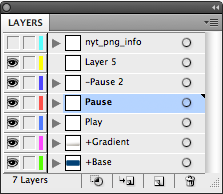
When you run this script on this file, it will export 2 PNGs: Play.png and Pause.png. The “+Button” and “+Gradient” layers will appear in the background of both exported files, and it will skip the “-Pause 2” and “Layer 5” layers.
twittrd.ericson.net
A year or so ago, I discovered Topsy, which lets you plug in a URL — say, for example, for a nytimes.com graphic like our Netflix map — and see how many times people have tweeted about it and what they’re saying. It’s a great service, but its one downside is that you have to search for URLs one at a time. And sometimes you want to see how a bunch of URLs are doing relative to each other.
So, I put together a little Rails app that takes a Web site — something like the NYT home page — and looks up the first 150 or so URLs that it finds on the page using the Topsy Otter API, then displays how often they have been tweeted as an overlay on the page itself.

The app is up at twittrd.ericson.net. A few things to note:
- By default, it only looks up URLs that have a date or numeric ID in them. This is a crude way to filter down the page to just stories rather than looking up things like page nav.
- It rewrites the URLs to point to their page on Topsy, so clicking on a link will take you to the Topsy page that shows all the tweets about that URL.
- Depending upon a site’s HTML structure, the numeric overlays work better in some sites than others. nytimes.com looks reasonably close to real-life. msnbc.com does not.
- The Topsy API has a limit of 10,000 URL lookups in an hour. Since it will check up to 150 links on a URL, this means that if more than 60 or so people have been to twittrd in the last hour, I might be over my Topsy API limit. Check back the next hour to see if it’s reset itself.
- Topsy also doesn’t deal well with URLs that have the id of the story or post in the querystring, since it ignores everything after the querystring when searching. So your mileage may vary on sites with urls like post.php?id=12345.
- And it can be a bit pokey — it hits the Topsy API for each URL it finds on the page — so it can take 20 or 30 seconds to run.