Update: I’ve got a much improved version of the script that also exports artboards and adds a PDFs option. Get the improved version.
Hot on the heels of my Illustrator script to export artboards as PNG files, here’s one that exports Illustrator layers as PNG files.
To use the script, download Export-Layers-as-PNG.jsx and put in your Illustrator scripts folder (usually in Applications/Adobe Illustrator/Presets/Scripts/). Restart Illustrator, and run the script by going to “File > Scripts > Export Layers as PNG”.
- Files are named based on their layer name. It only exports layers where their name has been changed from the default “Layer 1”, “Layer 2”, etc.
- If you put a plus sign (+) in front of a layer name, that layer will always be visible. Useful for if you want to have a layer that always appears in the background of each exported image.
- If you put a minus sign (-) in front of a layer name, it will skip that layer.
- It stores its settings in a nonvisible, nonprinting layer named “nyt_png_info”
- It has an option for transparency, and lets you choose between PNG8 and PNG24.
You can try it out on the sample file layer-test.ai.

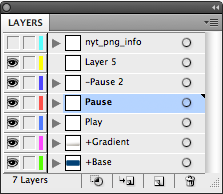
When you run this script on this file, it will export 2 PNGs: Play.png and Pause.png. The “+Button” and “+Gradient” layers will appear in the background of both exported files, and it will skip the “-Pause 2” and “Layer 5” layers.
Pingback: Export Illustrator Layers and/or Artboards as PNGs and PDFs « Matthew Ericson – ericson.net
This is an amazing time-saver!
..Although i’m wondering if you could suggest something even better for my situation.
The challenge i’m facing is exporting bunches of same-sized symbol instances (like, zillion on daily basis). Think of it as tiles with repeating elements (other symbol instances), and with some minor change in those elements i need to re-save all the containers.. a nightmare!
I can place them easily on the artboard, but your script works on layers, not objects in the layer. Putting symbols on different layers (i can use Release to Layers option) would require renaming those layers to math object names manually (or am i missing some AI features here?), or your script will skip it since they are named in default “Layer 1” style.
So far the best solution is to do some manual moving/renaming before using your script, but just wanted to check if there’s quicker solution (zillion, remember!).
Looking forward on your thought and thanks again for wonderful script!
Wonderful script, very useful for a font designer as me, thanks a lot !
This is wicked! I really need something like this, I create storyboards in illustrator and need to export all of the layers a different illustrations. I am getting an error in CS5, ” Could not complete this operation. A unknown error has occurred. ” I get it after is seems to try to export each layer.
Trouble shooting?
Hey there. Is ist possible to add svg support to that script. I’d really would appreciate that. I would give it a try, but i don’t know where to start.
Hi – brilliant many thnx – the script works like a charm!
it doesn’t seem to work with layers nested within layers – which would be handy for organizing but otherwise it’s perfect! i’m working on an illustrator file that has multiple layered instances a with a perspective grid road and route instructions – this way i can easily adjust the perspective, the size, etc
@Ivar: I intentionally didn’t want it to work on layers within layers — this way, I can continue to use layers inside each top-level layer to organize my work without having to worry about nested layers getting exported, too.
@Jacob: Possibly. I’ll take a look at that next time I do an update.
Amazing time saver, thank you so much! I’m also a javascript developer but I didn’t know CS scripts are written in JS. Really exciting that I can potentially write my own in the future.
thanks!
Pingback: 20 Adobe Illustrator Tips, Tricks & Resources for Designing for Web in Illustrator
Pingback: IllustratorでWEB制作するなら!レイヤーごとのPNGファイルを書き出すスクリプト「Export Illustrator Layers as PNGs」 | yugurido
@Jason I was having the same problem – “Could not complete this operation. A unknown error has occurred.” on a few of my layers – turns out the layer names were invalid as file names (eg they contained a slash or something); I renamed them and everything worked fine. Great script!